Seedream release notes

Seedream 5.0 Pro — July 8, 2026 release

The design-intelligence release expands dense visual communication, controllable editing, photographic realism, and multilingual creation. Here is what ByteDance demonstrated, what we tested, and what Seedream Studio exposes today.

A Seedream 5 Pro scene separating into translucent visual layers around a chair and interior.
Generated with Seedream 5 Pro from a documented prompt. This is a flattened image illustrating the release theme, not evidence of an editable layer export.

Release facts

Released
July 8, 2026
Studio status
Current default image model
Available modes
Text-to-image and reference-image editing
Image references
Up to 10 images for Pro editing
Generation cost
75 credits Standard · 100 credits High
Pixel ceilings
Standard up to 2.36 MP · High up to 4.19 MP

What actually changed in Seedream 5.0 Pro

ByteDance groups the release into four core breakthroughs. We connect each one to a production job, a visible output, and the current Seedream Studio surface.

Capability 1

Complex information visualization

Pro plans hierarchy, text, diagrams, and product imagery together instead of treating each element as an isolated decoration.

  • checkProduct launch boards and campaign layouts
  • checkEducational explainers, charts, and diagrams
  • checkInformation-dense posters and UI concepts

Seedream Studio availability

Available through Pro text-to-image. Verify facts, calculations, dates, and small labels before publishing.
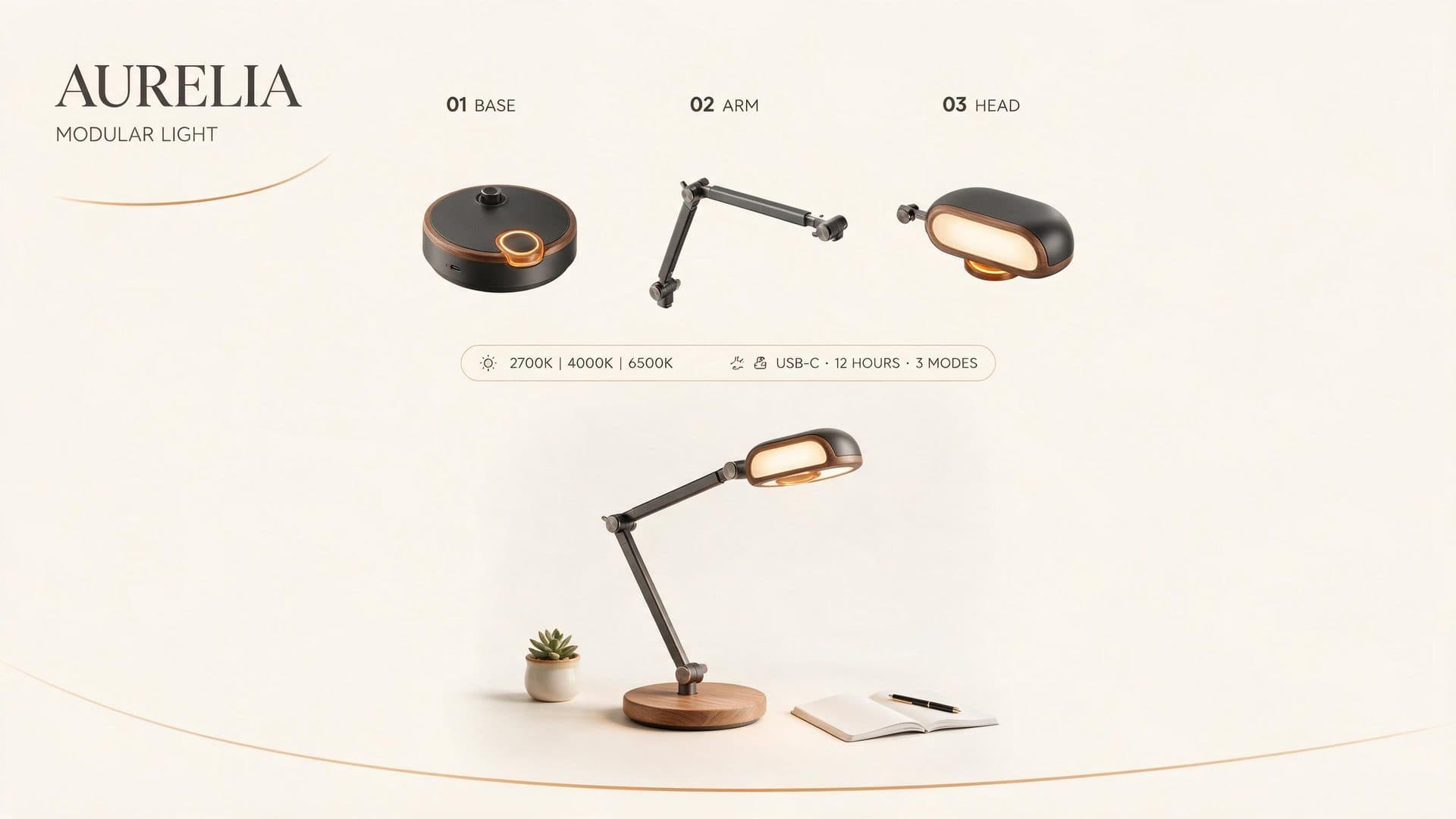
AURELIA modular desk lamp launch board with three labeled components, an assembled lamp, and a compact specification strip.

Our first AURELIA output rendered the requested headline, component labels, product diagram, and compact specification strip in one coherent 16:9 layout.

Exact generation prompt

A premium 16:9 product-launch infographic for a fictional modular desk lamp. Exact headline: “AURELIA”. Exact subhead: “MODULAR LIGHT”. Show three clean exploded-view component diagrams labeled “01 BASE”, “02 ARM”, and “03 HEAD”. Include one compact specification strip with the exact text “2700K | 4000K | 6500K” and “USB-C · 12 HOURS · 3 MODES”. Warm ivory background, charcoal typography, muted amber accents, strict editorial grid, generous white space, realistic product render, crisp small text, no logos other than the fictional AURELIA wordmark.
Capability 2

Interactive precision editing

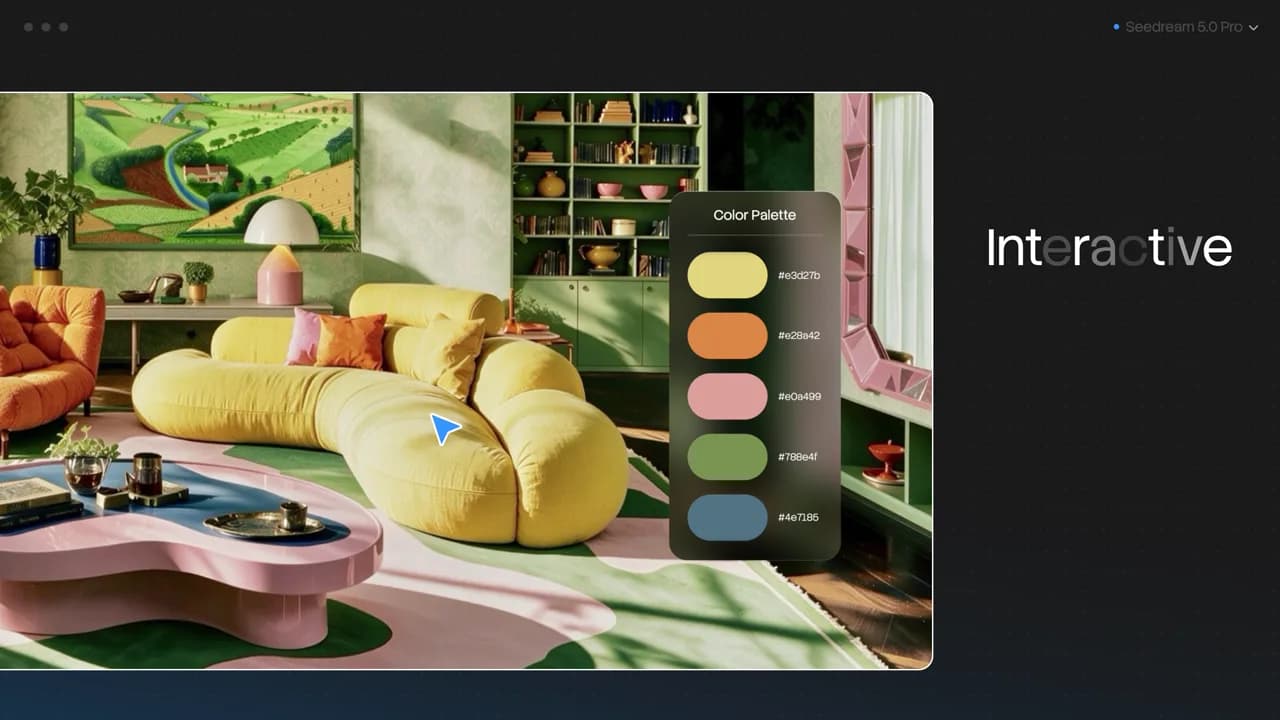
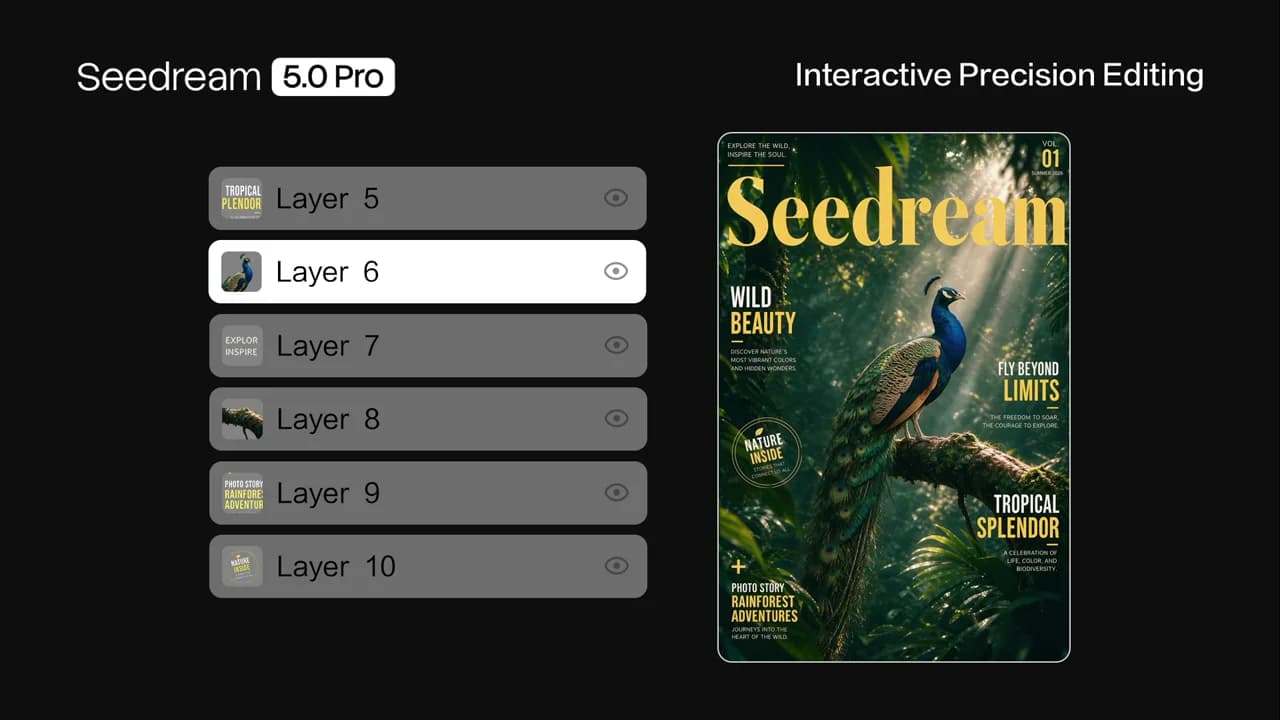
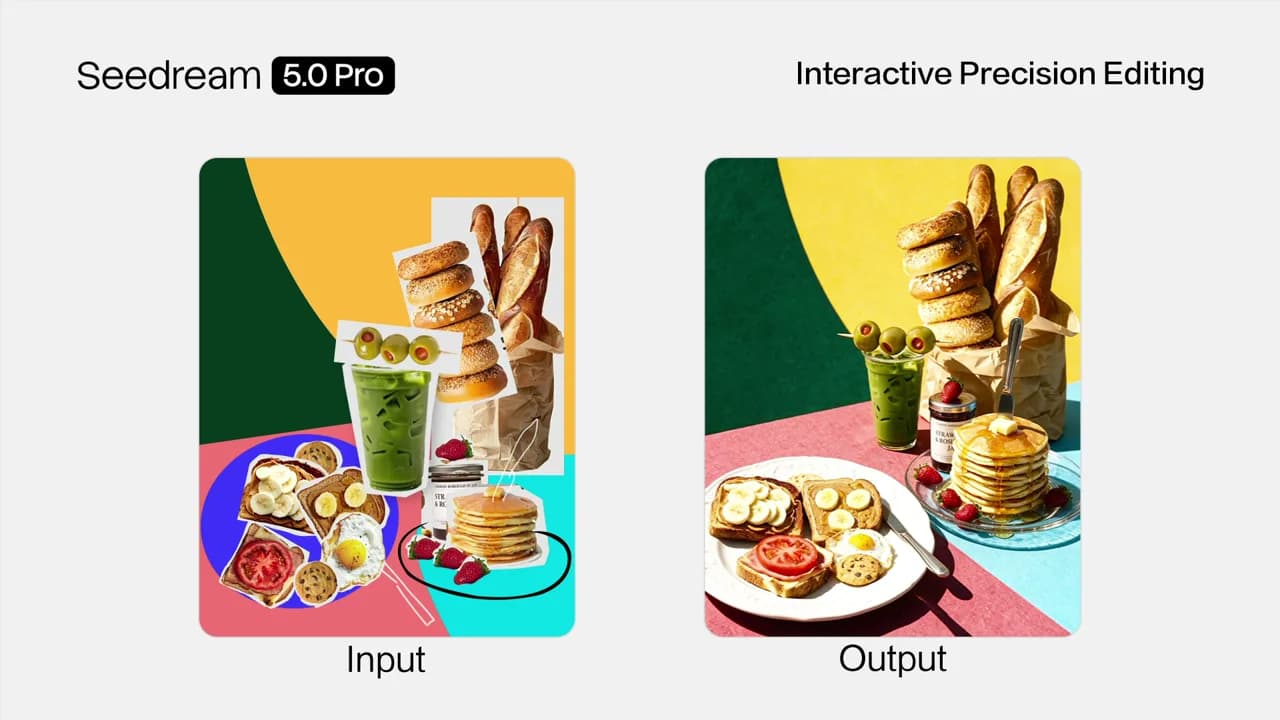
The model can interpret spatial guidance and combine targeted changes with surrounding context, color or material replacement, sketch rendering, layer separation, and multi-image fusion.

  • checkBounded revisions without restarting the whole composition
  • checkColor, material, object, and layout changes
  • checkSketch-to-image rendering and multi-source composition
  • checkSeparating visual elements for downstream design work

Seedream Studio availability

Reference-image editing is available. Dedicated point, lasso, and box controls—and transparent editable-layer export—are not claimed as current Studio controls.

A chair and interior separated across translucent planes with a highlighted selection boundary.

This Pro-generated layered scene is an illustrative flattened JPEG. The official videos below are the source for ByteDance's layer-separation and multi-image-fusion demonstrations.

Exact generation prompt

A cinematic hero image for a design-intelligence AI model. A single premium product scene assembles itself from floating translucent layers pulling apart in mid-air — a foreground subject, a midground, and a background separating cleanly like glass panes, edges crisp and alpha-clean. Threads of light trace precise selection outlines around one element. Deep charcoal studio backdrop, warm volumetric key light with cool cyan rim, shallow depth of field, shot at 35mm f/2. Elegant, restrained, high-end. Zero legible text.

Capability 3

Realistic imagery and portrait texture

Pro improves its treatment of lighting, reflection, materials, skin detail, and photographic motion so commercial scenes feel more physically grounded.

  • checkEditorial portraits and fashion campaigns
  • checkProduct, interior, and architectural visualization
  • checkLighting changes and photoreal image revisions

Seedream Studio availability

Available through Pro generation and editing. Treat each file as a result to inspect, not a guaranteed physical simulation.

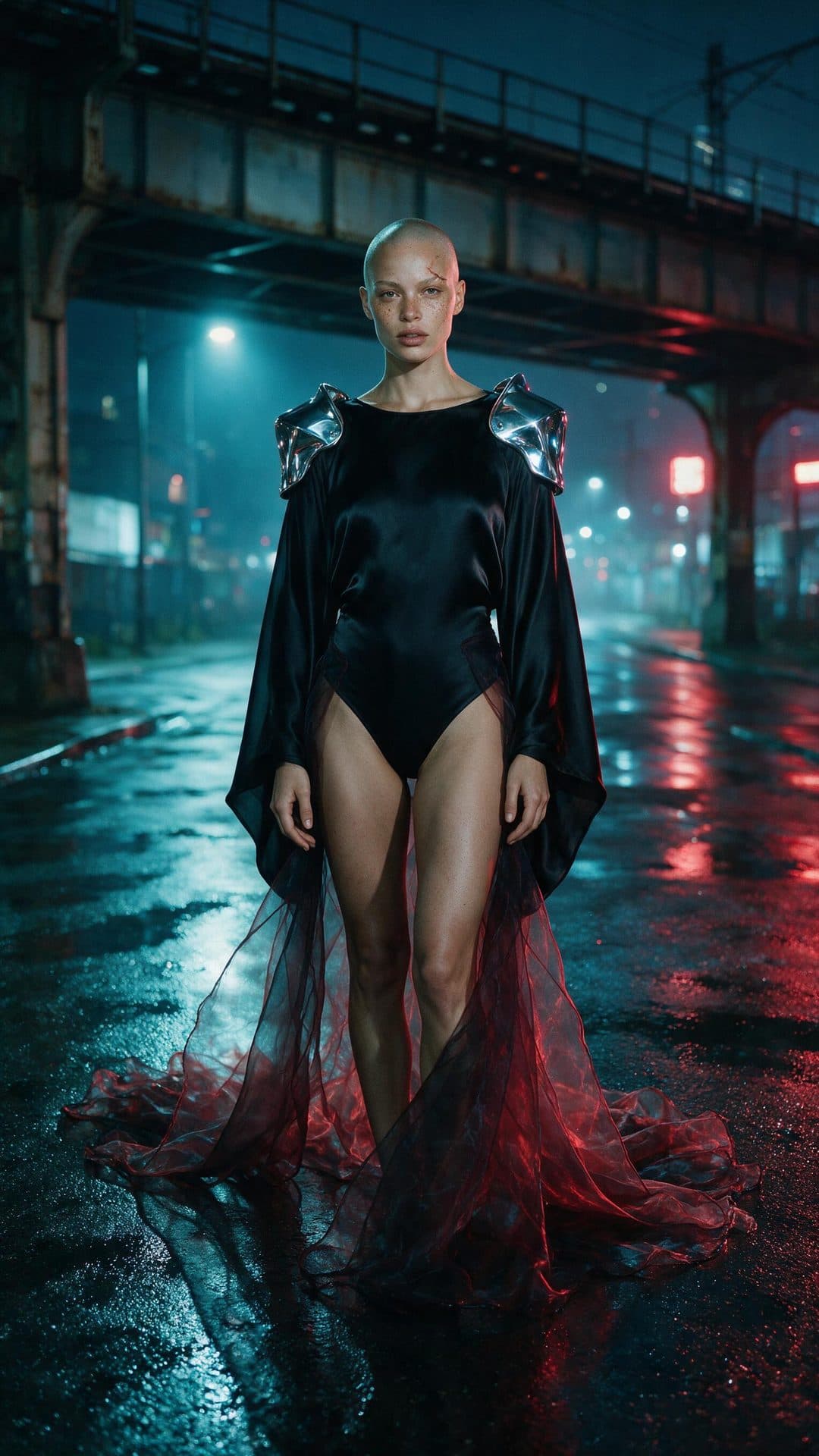
A shaved-head adult fashion model in chrome shoulders and a black bodysuit on a rain-wet red-and-cyan-lit street.

Our first After Midnight output preserved visible freckles, an eyebrow scar, plausible hands, tactile skin, fabric, chrome, and wet red-and-cyan street reflections.

Exact generation prompt

A vertical 9:16 luxury fashion campaign for a fictional independent label. One fictional adult model, age 29, full body, standing beneath a rain-slick elevated train at midnight. She has a shaved head, visible freckles, a small healed eyebrow scar, and wears sculptural chrome shoulder armor over an opaque ink-black silk bodysuit with a long translucent organza train; chest and pelvis fully covered. Both hands fully visible with natural anatomy. Wet pavement reflects deep crimson signage and cold cyan streetlight. 50mm editorial photography, believable skin texture, restrained film grain, confident direct gaze, high-fashion composition, no legible text, no logos, no celebrity likeness, no explicit nudity.

Capability 4

Native multilingual creation

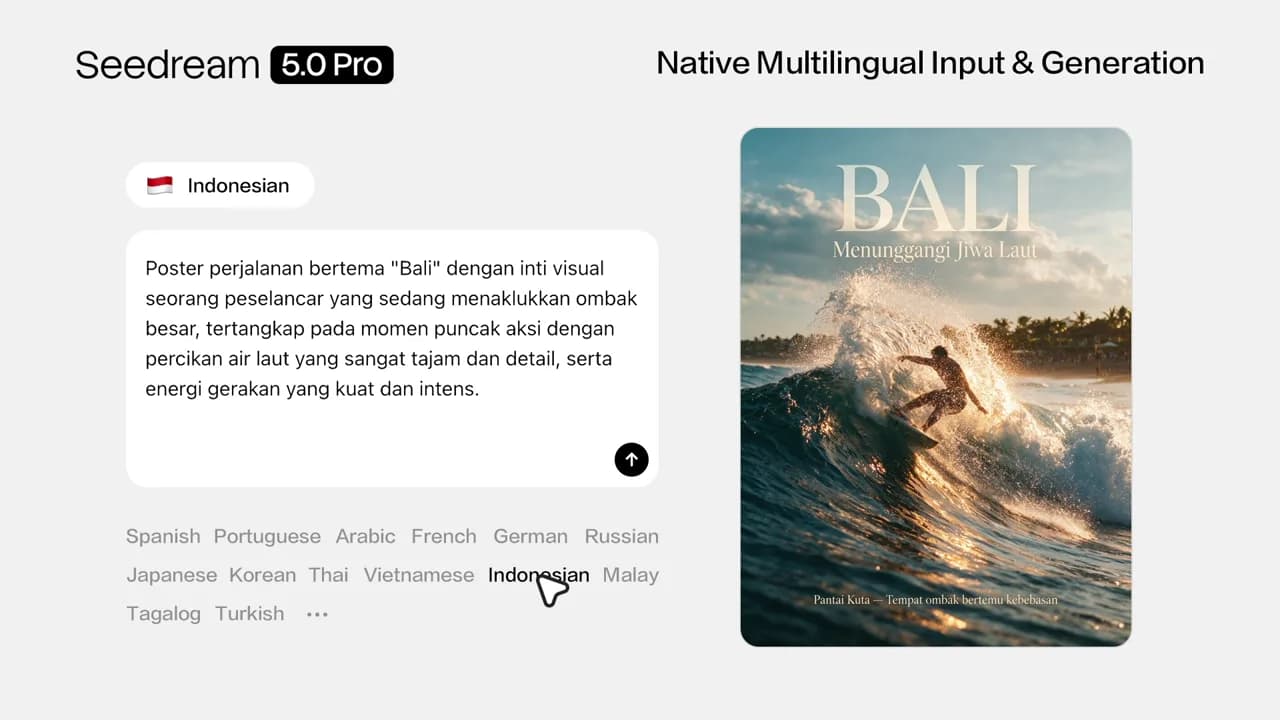
ByteDance says Pro accepts prompts and renders in-image text across more than ten languages while adapting visual context and typography to local conventions.

  • checkLocalized posters, notices, menus, and campaigns
  • checkRight-to-left and accented-script visual concepts
  • checkMultilingual educational and public-information graphics

Seedream Studio availability

Available in Studio. Proofread every generated line against approved source copy before delivery.

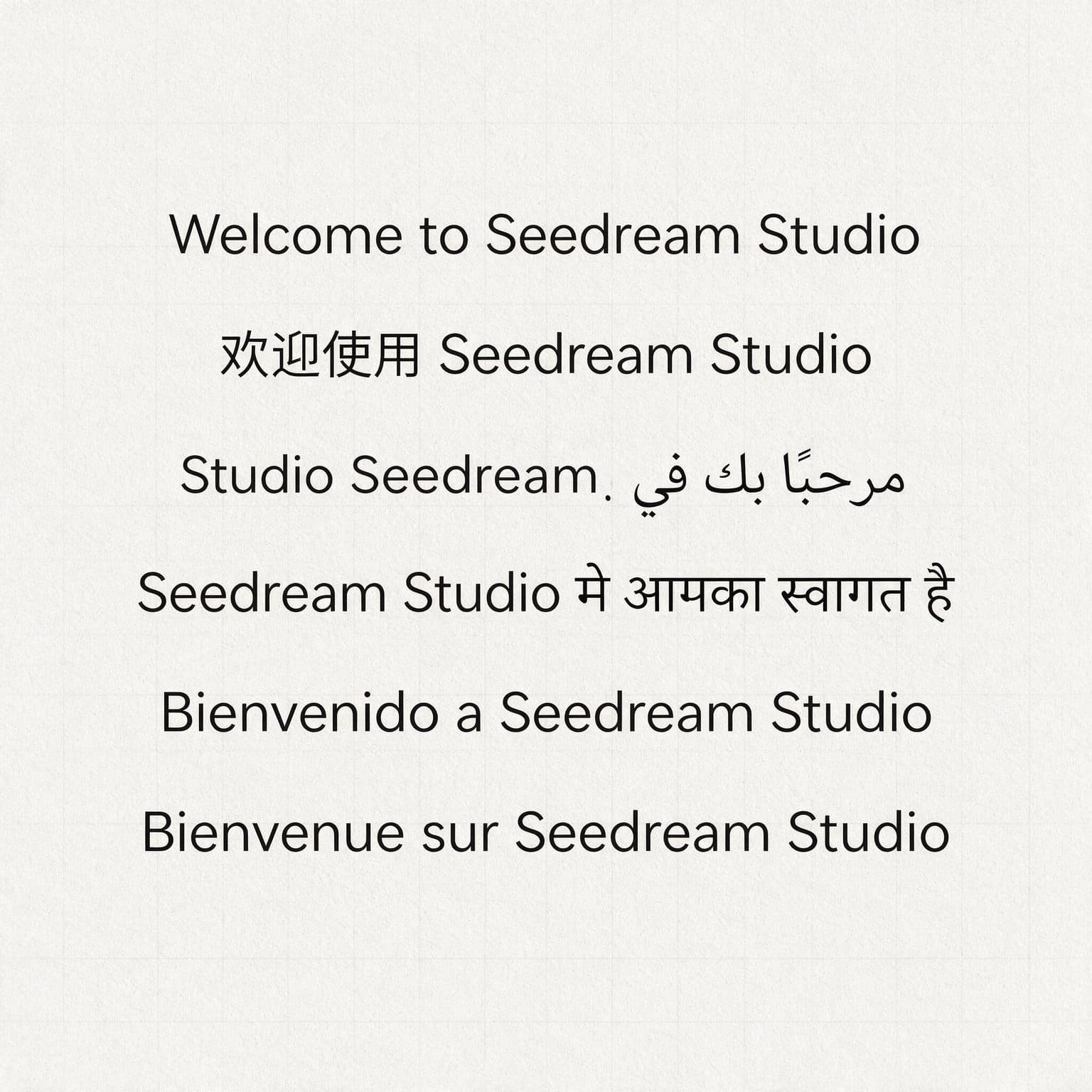
A six-language Seedream Studio greeting poster in English, Chinese, Arabic, Hindi, Spanish, and French.

In our one-run six-language poster, four lines were exact; Arabic reversed the Latin brand order and Hindi omitted one mark. That makes the sample useful evidence, not a universal accuracy claim.

Exact generation prompt

A clean modern typographic poster, light neutral background, demonstrating multilingual text rendering. The poster displays the single greeting phrase "Welcome to Seedream Studio" repeated in six languages, each on its own line, correctly written and legible: English "Welcome to Seedream Studio"; Simplified Chinese "欢迎使用 Seedream Studio"; Arabic "مرحبًا بك في Seedream Studio" rendered right-to-left; Hindi (Devanagari) "Seedream Studio में आपका स्वागत है"; Spanish "Bienvenido a Seedream Studio"; French "Bienvenue sur Seedream Studio". Crisp editorial sans-serif for Latin, correct native scripts for the others, generous spacing, subtle grid, soft studio lighting. Accurate glyphs and correct letterforms are the point.

Official ByteDance release demos

These are ByteDance Seed's first-party demonstrations from the July 8 release article. They show the provider's model workflows; they are not recordings of the Seedream Studio interface.

Videos stay unloaded until you choose Play. The 4K overview is approximately 254 MB.

An Indonesian prompt beside a localized Bali travel poster in ByteDance's multilingual demo.

Native multilingual generation

15s

The demo switches prompt languages and generates localized travel and lifestyle visuals that reflect the selected language and context.

Available in Seedream Studio today

These are the capabilities our current product surface can directly support.

  • check_circleSeedream 5 Pro text-to-image generation
  • check_circleReference-image editing with up to 10 input images
  • check_circleStandard and High output tiers with JPEG or PNG delivery
  • check_circleExact-prompt evidence and reviewable generation history

Shown by ByteDance, not a dedicated Studio control

The model demonstrations are real, but the interaction or export format is not necessarily exposed as a matching control in our interface.

  • infoNative point, lasso, box, and doodle selection tools
  • infoDirect color-swatch or Hex-code material controls
  • infoTransparent independent-layer export and layer manipulation

Known limits and review requirements

ByteDance itself notes room to improve fine-grained text and pixel-level edit consistency. Production use still needs human review.

  • fact_checkProofread small labels, names, dates, and dense paragraphs.
  • fact_checkVerify calculations, charts, facts, and scientific content.
  • fact_checkCompare targeted edits with the untouched source context.
  • fact_checkReview every language against approved localized copy.

Seedream version history

  1. Seedream 5 Pro

    July 8, 2026

    Design-intelligence flagship with complex information visualization, interactive precision editing, richer realism, and native multilingual creation.

    View first-party sourceopen_in_new
  2. Seedream 5 Lite

    February 13, 2026

    Added deeper visual reasoning and optional online search for current, knowledge-aware image creation.

    View first-party sourceopen_in_new
  3. Seedream 4.5

    December 2025

    Improved prompt adherence, image editing, fine detail, and sequential generation workflows.

    View first-party sourceopen_in_new
  4. Seedream 4.0

    September 9, 2025

    Unified generation and editing, expanded multimodal references, advanced text rendering, adaptive aspect ratios, and output up to 4K.

    View first-party sourceopen_in_new

Seedream 5 Pro release FAQ

What is the latest Seedream model?

Seedream 5 Pro, released July 8, 2026. It is the current default image model in Seedream Studio.

What is the main difference between Pro and Lite?

Pro is the design-intelligence flagship for structured layouts, controllable revision, realism, and multilingual visual work. Lite emphasizes fast reasoning-led generation and iteration.

Are these videos from Seedream Studio?

No. They are first-party ByteDance Seed release demonstrations. The page separately identifies which workflows our current Studio interface exposes.

Does Studio expose every annotation and layer tool shown?

Not as matching dedicated controls today. Studio supports reference-image editing, but this page does not claim native point, lasso, or transparent layer-export controls in the current interface.

Test the release on your own brief

Start with 75 free credits, inspect the exact output, and choose Pro when design structure and controlled revision matter.

Seedream 5.0 Pro Release Notes — Capabilities and Official Demos | Seedream Studio