Seedream 5 Pro vs Lite: Capability or Speed?
Pro emphasizes structured design and controlled revision. Lite emphasizes fast production. Start with the work, then inspect the same-prompt result.
The Short Version
Seedream 5 Pro is built for dense layouts, multilingual text, and precision editing. Seedream 5 Lite is built for fast iteration and production volume. The controlled AURELIA run below shows one concrete layout-and-typography case; it does not declare a universal winner.
Side-by-Side Comparison
| Feature | Seedream 5 Pro | Seedream 5 Lite |
|---|---|---|
| Role | Design-intelligence flagship for structured creative work | Production model for fast iteration |
| Reference images | Up to 10 | Up to 10 |
| Editing | Point, lasso, and sketch-guided precision editing | General image editing for rapid iteration |
| Multilingual text | Multilingual in-image text and structured typography | In-image text for straightforward production briefs |
| Dense layouts | Dense, information-heavy layouts with explicit hierarchy | Straightforward compositions and repeatable formats |
| Speed | Controlled, design-focused workflow | Fast generation and iteration |
| Best for | Campaign systems, annotated revisions, and dense visual communication | Rapid exploration, batches, and repeatable production |
Comparison based on publicly available information as of February 2026. Features and pricing may change.
Same Prompt, Controlled Run
Both models receive the identical fictional AURELIA product-launch infographic prompt. We run the prompt once on each model at its native 16:9 size.
One prompt and one run per model: Pro was requested at the canonical 2720×1530, and Lite at the canonical 3072×1728; both published files were resized with their aspect ratios preserved to the same 16:9 display frame.
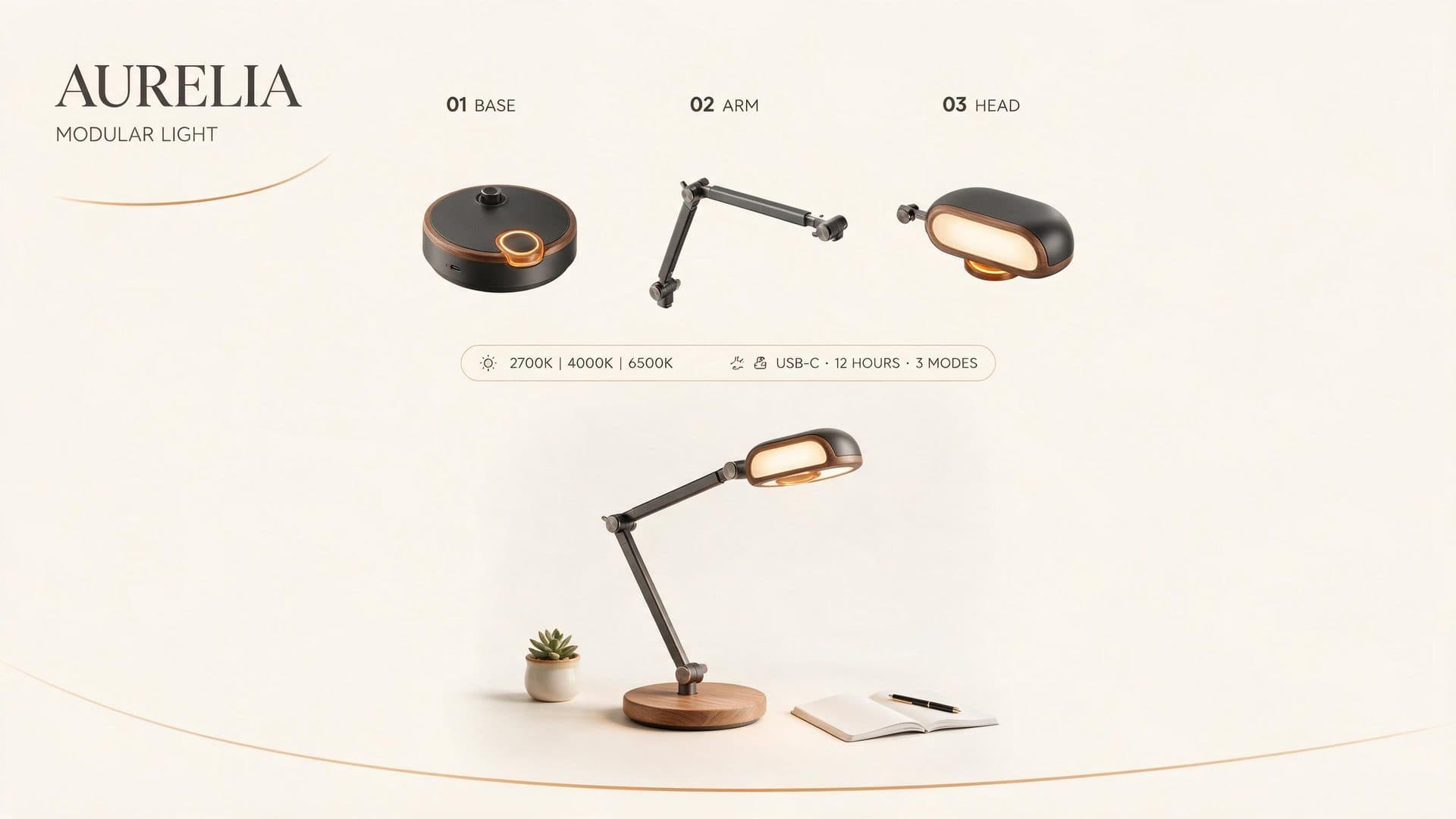
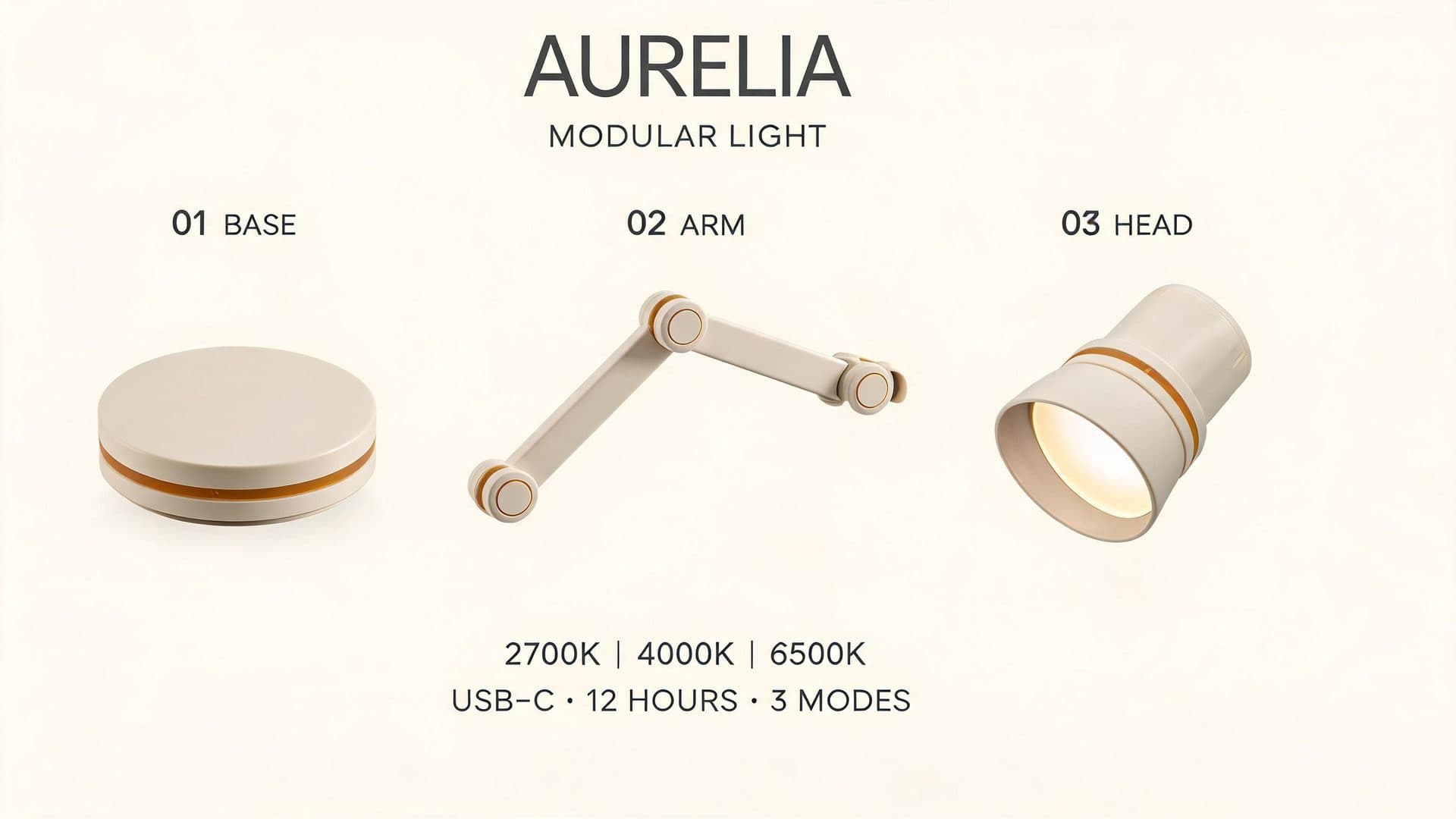
In this one prompt and one run per model, Pro reproduced all requested text exactly, included the compact specification strip, and paired the exploded components with an assembled lamp. Lite kept every requested word and number legible, but visibly rendered “USB–C” with a longer dash than the prompt’s “USB-C” and omitted the compact strip container, placing the specifications in two loose lines.
What This Controlled Run Shows
Both models produced a usable fictional product board from the same exact prompt. Their visible differences are documented under the images rather than turned into a blanket ranking.
This case tests a structured 16:9 typography brief. It does not settle every portrait, editing, illustration, or architecture workflow.
Choose Seedream 5 Pro for Complex Design Work
Pro is the default when the job depends on layout intelligence or exact interventions.
- checkDense infographics and structured, information-heavy compositions
- checkMultilingual and in-image text where hierarchy and placement matter
- checkPoint, lasso, and sketch-guided precision editing
- checkLayer separation for workflows that need scene elements isolated
Choose Seedream 5 Lite for Fast, High-Volume Work
Lite is a practical starting point when the workflow depends on rapid iteration and repeated production.
- checkFast generation when turnaround matters
- checkRepeated batches and high-volume production
- checkQuick exploration across several visual directions
- checkStraightforward compositions that do not depend on dense information hierarchy
Also Compare
Frequently Asked Questions
Neither model wins every workflow. Seedream 5 Pro is designed for structured layouts, multilingual text, and precision editing; Seedream 5 Lite is designed for fast iteration and production volume.
Yes. Each model received the exact same AURELIA prompt once at its canonical native 16:9 request size. We did not rerun either model for quality.
It tested a fictional product board with exact headings, three labeled components, a specification strip, and a strict editorial grid. The observations apply only to those two published files.
No. One controlled pair is useful evidence for that prompt, not a universal model ranking. Test the model on your own subject and delivery constraints.
Try Seedream 5.0 on Seedream Studio
Start with 75 free credits. No subscription, no credit card required.